Eagle_Eye
|
|
How do I use a skin or turn on save stats with DFLW?
If you want to use a skin, or any edited item it doesn't need to be packed into a pff file to work. You can just place it in the DF directory and turn
on the "use resources from the folder" instead of the pff file.
There a few commands that work with this method. They are..
/d = use resources from the game directory.
/s = save scores in a text file in the game directory
/w = open game in a window
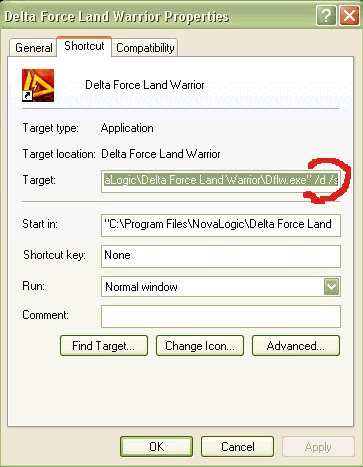
To do this you must edit the target line of your DF icon. Find your icon, right click on it, go to properties. On the target line, right at the end,
after the last " add in a (space)/d then hit OK. See the pic below. It works for all the DF series, Except DF1, where it must be packed into the pff
file.
See below pic..
|
|
|
|












![[*]](images/aventure/default_icon.gif)


