PhibrOptik-LRS-
Grunt

Posts: 3
Registered: 3-1-2008
Member Is Offline
|
|
Looking for Some Help Please
I am a map maker for www.LRS-HQ.com I have been trying to build a specific terrain to use in some of my maps, but I have had no luck. I went and looked through
several of the tutorials here on your site and downloaded everything I need (i.e. BHD Mod Tools, PFF Utility, etc.) I use PhotoShop CS3 Extended on a
daily basis, so I know how to use it. My first attempt at a terrain was using all of the "sample" files that you get with BHD Mod Tools. I did
everything that the instructions said...and I "thought" everything went good. But when I went to my Map Editor to look at the terrain...it was no
where to be seen. So I tried again, only this time using my own stuff instead of the "sample" stuff. Same thing happened. What I am wanting should
not be very difficult. There are no elevations. Just a flat terrain like the stock "Flat"...only instead of "desert dirt", I want grass. I don't
even want individual blades of grass sprouting up...just a flat green turf. If ANYONE could please help me on this you would forever be in my good
graces. Seeing as how I have tried, tried, and tried again...I was hoping that maybe someone could build it for me and then maybe e-mail it to me.
This is the ONLY terrain that I need that isn't already built in.
There is a perfect example of what I am wanting if you happen to have the Shock n Awe Version 4.0 Map Editor for DF:BHD. It is listed under "Foliage"
and then "Shock-Grass Section"
I would use this, but some of the areas I want to cover would require placing WAAAAY too many of these individual pieces. And as anyone who makes
maps knows...there are only so many pieces that you can place in one map before it starts barking obscenities at you.
ANY help on this would be greatly appreciated.
Also...is there anywhere on this site that you can download terrain files? If so, where? Because I looked and couldn't find anything.
|
|
|
BuLL*
Private
Posts: 63
Registered: 4-15-2006
Member Is Offline
Mood: Slowly losing m
|
|
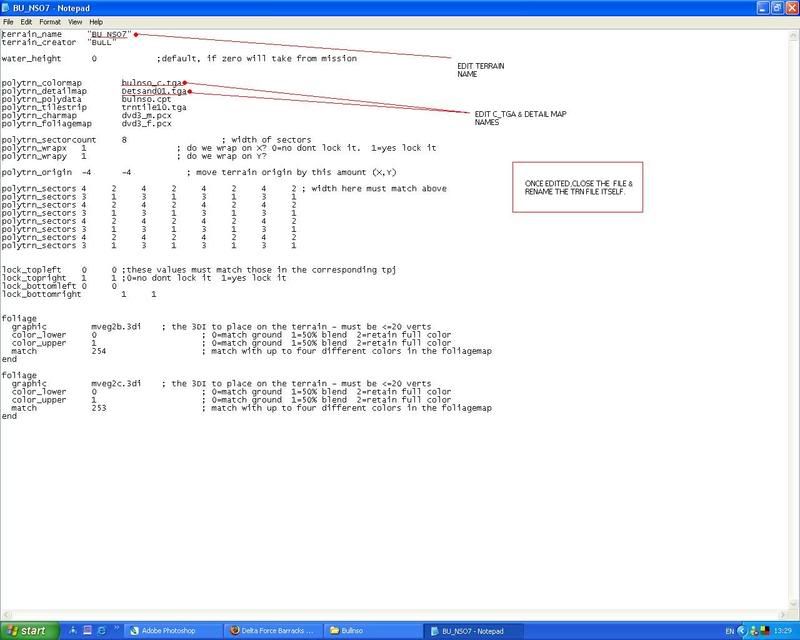
Extract the Flat.trn from the pff....
Now extract the polytrn_detailmap,in this case it`s Detsand01.tga
polytrn_colormap bulnso_c.tga
polytrn_detailmap Detsand01.tga
polytrn_polydata bulnso.cpt
polytrn_tilestrip trntile10.tga
polytrn_charmap dvd3_m.pcx
polytrn_foliagemap dvd3_f.pcx
This is the file that gives the terrain it`s sandy looking ground detail.
If u want a flat grass textured terrain.Search through all the polytrn detail images to find one that is a grass image(or make one yourself)gotta be
seamless though.
Then all u need is to edit the stock flat c_tga
so it`s green looking.
Then edit the polytrn detail map name in the trn to the one you want,also edit the c_tga,polytrn colour map name with your new "green" colour
map...Name it green.tga
whatever,as long as it`s different from the stock name.
Ok once that is done rename /edit the terrain name within the trn file,then rename the trn file itself.Call it Flat_grn for example.
Then place the new trn,c_tga & new detailmap(if u make a new one) into the resource pff....If u use a stock detailmap it`s obviously already in the
pff.
Open your med & your terrain should be available to choose in the drop down list.
TRN IMAGE HERE
|
|
|
PhibrOptik-LRS-
Grunt
Posts: 3
Registered: 3-1-2008
Member Is Offline
|
|
SOLVED!!!
BuLL*.........YOU ARE THE FRIGGIN MAN!!!!!
Thank you. I can't believe it was THAT simple. Here I was trying to use the Terrain Generator and I never needed it. I did exactly what you said
and it worked beautifully. I didn't change the Detail image, just the color in the color map. And it turned out awesome. Thanks again.
|
|
|
BuLL*
Private
Posts: 63
Registered: 4-15-2006
Member Is Offline
Mood: Slowly losing m
|
|
Ah nice one bud.Glad your sorted
|
|
|












![[*]](images/aventure/default_icon.gif)