| Pages:
1
2
3 |
Porov
Private

Posts: 65
Registered: 4-14-2004
Location: EU
Member Is Offline
|
|
Camera Movement at the Beginning, and End of an SP mission
So everybody knows that allmost every mission in the single player campaign(BANDITS CROSSING for eg)when is finished the camera is being moved around
and the commander congratulates u for the victory.But with my mission is not so,when it is finished the camera stays at one spot and doesnt moves,how
could i make it move.
|
|
|
Eagle_Eye
|
|
I found it depends on the movement of the player at the time that the mission ends..
If a player is standing still, then there will be no movement..
If the player was say in a helo, then there will be an animated end..
Try it....create a mission, throw in a helo, on some waypoints, and an event to win the mission while your on the helo, say something like blue wins
if AI killed, then put an AI on the wayponit path, so you can kill him with the mingun, then play the mission, and watch the ending, it will have
exactly what you want I think..
EE
|
|
|
Porov
Private
Posts: 65
Registered: 4-14-2004
Location: EU
Member Is Offline
|
|
i dont think ill mange to do it myself,why dont u or somebody else make tutorial about this
|
|
|
Eagle_Eye
|
|
Well, I don't think it needs a tut, just plan the mission ending so that the player is riding a vehicle when the mission ends..
If I get time, I'll do a test mission, and post it..
EE
|
|
|
Eagle_Eye
|
|
OK, Here is a test Mission I just did..
It's a small SP map, just ride the helo and kill the Bad Guy with the minigun, and watch the ending.
The only difference is that the player is moving fast in the helo when the mission ends..nothing special..no tricks here..
Right click on the link, and "Save Target As"..
http://images.dfbarracks.com/users/eagleeye/Zips/SPMisEnd.zi...
EE
|
|
|
Porov
Private
Posts: 65
Registered: 4-14-2004
Location: EU
Member Is Offline
|
|
nice invention Billly but I need the camera to move to a designated direction without seeing the choper or the minigun. i mean not seeing from the
players eyes. i need to do something like in the end of bandidts crosing when the bridge explodes
|
|
|
Eagle_Eye
|
|
Don't remember the ending of that Mission..this is about my limit of knowledge about ending the game with animations...
EE
|
|
|
Porov
Private
Posts: 65
Registered: 4-14-2004
Location: EU
Member Is Offline
|
|
replay it then please and ask somebody if he knows,i will be very thankful if u supply me with the information that i need
|
|
|
Eagle_Eye
|
|
OK, I can tell you this..
One of the files for that mission is called SPBHD_02.end..I decoded that file..there seems to reference to camera angels in that file, what they are,
or what they do, I have no idea, but it's a start..see what you can figure out..
Here's the file decoded to a text file..
********************************
BACKUP_DIR "D:\nc\df5bin\"
PRIMARYCAMERA_INDEX CAMERA1
BEGIN MOVECAMERA
TICKS_START 0
TICKS_DURATION 568
CINDEX CAMERA1
CBEGIN 746.606 -396.560 31.325 107.438 0.469 0.000
CEND 760.391 -395.906 39.432 120.797 349.570 0.000
CBEGIN_COM 0 0 0.000 0.000 0.000 0 0 0.000 0.000 0.000 328.000 0.000 0.000
CEND_COM 0 0 0.000 0.000 0.000 0 0 0.000 0.000 0.000 0.000 0.000 0.000
FOV 5242880
CURVE_TYPE 0
CURVE_PARAM 0.000000
END
********************************
EE
|
|
|
Porov
Private
Posts: 65
Registered: 4-14-2004
Location: EU
Member Is Offline
|
|
thanks i might use it
|
|
|
Porov
Private
Posts: 65
Registered: 4-14-2004
Location: EU
Member Is Offline
|
|
of topic-have us seen the sp campaign missions,do you know how many waypionts thEy have-RIVER RAID FOR EG HAS ABOUT 700!!!!!!!!WHY THEY ARE SO MUCH
I ALLMOSTFORGOT HOW I DECODE THE TEXT FILE TO END FILE AND END FILE TO TEXT
|
|
|
Eagle_Eye
|
|
I used the tools from DV...
If you need them, U2U me, and I'll send you the link, or email them to you..
When you decrypt the file, it won't be recognised as a valid file, but, if you rename it as a def file, ie..SPBHD_02.end.def, then it will work.
There are a heap of waypoints for the AI movements, that's what it takes to create a great SP misiion..lots of different setups in the events...Most
SP made by NON Nova people have 20 or 30 events at most..the Nova maps usually have 100 to 200 events, cos they cover all possiblities..
EE
|
|
|
Porov
Private
Posts: 65
Registered: 4-14-2004
Location: EU
Member Is Offline
|
|
thanks now i know allmost everything i need to know
|
|
|
TrSniper
Captain
Posts: 335
Registered: 8-16-2004
Location: Netherlands
Member Is Offline
|
|
CIN
The Files to make camera movement on the end of mission ore beginning is made with CIN.Files.I don't know how to create them but you can copy them
from Vlads missions in enemy terratory and rename them to your maps.
|
|
|
Eagle_Eye
|
|
Well, I know Vlad, and his maps, I haven't any on file..but, I just rechecked the pff files from BHD, BHDTS and EXP, there's not 1 .cin file in
there..!!!!
.cin files are however used in Commanche 4..here's one I decrypted..seems to contain the same kind of stuff, so, we can assume that BHD uses the .end
file instead of the .cin file like C4..
PRIMARYCAMERA_INDEX CAMERA2
BEGIN MOVECAMERA
TICKS_START 0
TICKS_DURATION 688
CINDEX CAMERA2
CBEGIN -981.000 -1207.000 17.000 187 358 000
CEND -1034.000 -1088.000 17.000 245 000 000
FOV 4259840
CURVE_TYPE 0
CURVE_PARAM 0.000000
END
BEGIN EDITFADE
TICKS_START 1747
TICKS_DURATION 93
CINDEX_BEGIN CAMERA2
CINDEX_END CAMERA0
END
BEGIN MOVECAMERA
TICKS_START 1280
TICKS_DURATION 559
CINDEX CAMERA2
CBEGIN 2621.000 1481.000 24.000 274 000 000
CEND 2629.000 1481.000 24.000 274 000 000
FOV 4259840
CURVE_TYPE 0
CURVE_PARAM 0.000000
END
BEGIN MOVECAMERA
TICKS_START 938
TICKS_DURATION 468
CINDEX CAMERA1
CBEGIN 2973.000 2079.000 79.000 250 321 000
CEND 2783.544 1647.601 128.608 247 351 000
FOV 4259840
CURVE_TYPE 0
CURVE_PARAM 0.000000
END
BEGIN EDITFADE
TICKS_START 564
TICKS_DURATION 126
CINDEX_BEGIN CAMERA2
CINDEX_END CAMERA3
END
BEGIN MOVECAMERA
TICKS_START 563
TICKS_DURATION 501
CINDEX CAMERA3
CBEGIN -1091.000 -1133.000 16.000 013 353 000
CEND -1088.000 -1130.000 16.000 277 354 000
FOV 4259840
CURVE_TYPE 0
CURVE_PARAM 0.000000
END
BEGIN EDITFADE
TICKS_START 1280
TICKS_DURATION 126
CINDEX_BEGIN CAMERA1
CINDEX_END CAMERA2
END
BEGIN EDITFADE
TICKS_START 939
TICKS_DURATION 125
CINDEX_BEGIN CAMERA3
CINDEX_END CAMERA1
END
*******EDIT*******
OK, more facts...
The CIN files are for the intro camera the end files are for the ending cameras.
The CIN files where used in the demo, and although not used in the Full Version, are still recognised by the game, something Vlad has picked up on in
his mission.
You can't just copy and rename the files.
They are game specific, and the values must be set for the locations of your own map.
******End Edit******
EE

|
|
|
Eagle_Eye
|
|
OK, more info on the CIN and End files..
Here's a cin file from Vlads Missions..
BACKUP_DIR "D:\nc\df5bin\"
PRIMARYCAMERA_INDEX CAMERA1
BEGIN MOVECAMERA
TICKS_START 0
TICKS_DURATION 311 CBEGIN -418.200 -487.499 20.708 210 345 000
CINDEX CAMERA1
CEND -525.429 -548.177 20.833 210 345 000
FOV 4259840
END
BEGIN EDITFADE
TICKS_START 250
TICKS_DURATION 50
CINDEX_BEGIN CAMERA1
CINDEX_END CAMERA2
END
BEGIN MOVECAMERA
TICKS_START 300
TICKS_DURATION 351
CINDEX CAMERA2
CBEGIN -468.140 -526.296 21.708 193 345 000
CEND -468.140 -526.296 21.833 193 345 000
FOV 4259840
END
*************************************
CBEGIN -418.200 -487.499 20.708 210 345 000
breakdown..-418.200 -487.499 = camera start grid location, 20.708 = z value of camera start, 210 = angle of camera in degrees, 345 000 = not known
yet..
*************************************
From this info, you should be able to figure the rest out..I haven't finished looking at it yet..but I will in the next few days..
You may need Vlad's Map for reference, it's actually a Mod.. Vlad's Map
Once again, you can use DV's tools to decode the files, just rename the cin file as a def file..ie..mis26.cin.def, the use the decoder..
EE
|
|
|
joselz
Colonel
Posts: 491
Registered: 4-24-2004
Location: Davie, Florida, 33325. United State
Member Is Offline
Mood: OUT of MAPPING
|
|
???
| Quote: | Originally posted by Eagle_Eye
I used these tools from DV...
[/url]
When you decrypt the file, it won't be recognised as a valid file, but, if you rename it as a def file, ie..SPBHD_02.end.def, then it will work.
EE |
I use the program to edit the .END file and work good.
HOWEVER, the title of the program say :
" Dialog "
I try to open a dialog file, the .DBF and .LWF, and it does not work.
So, my question is:
Why does the title say DIALOG, and it does not work for dialogs???
|
|
|
Eagle_Eye
|
|
Sorry Joselz, not sure where your getting the title that says dialog !!??
DV's tools will not decrypt the .DBF and .LWF files..well, not that I've figured yet..I've tried most combinations of the tool..
EE
|
|
|
TrSniper
Captain
Posts: 335
Registered: 8-16-2004
Location: Netherlands
Member Is Offline
|
|
Told Ya it was the CIN,you can find him in outer limit
and i got one to that you can use VERRY GOOD,ill place it on the web if i got time.
|
|
|
Eagle_Eye
|
|
Comments like that will get you nowhere !!
One didn't dispute the Cin file..just questioned it's Non Use in BHD FV, and, after a short research, explained, which is what you didn't do, your
first post gave a tip only....
As stated in a previous thread..this is not a competition, it's a community where we share info..it's not a case of who's better, or worse, or who
knows more than the other..so, that taken into consideration, thanks for the tip, but you can keep the attitude..!!
EE
|
|
|
Eagle_Eye
|
|
OK, here's some more info..I've been doing a lot of testing..lol...getting the Camera angles right..
Seems Nova turned the compass on it's side, and mirrored it...so I made this chart for members to use..
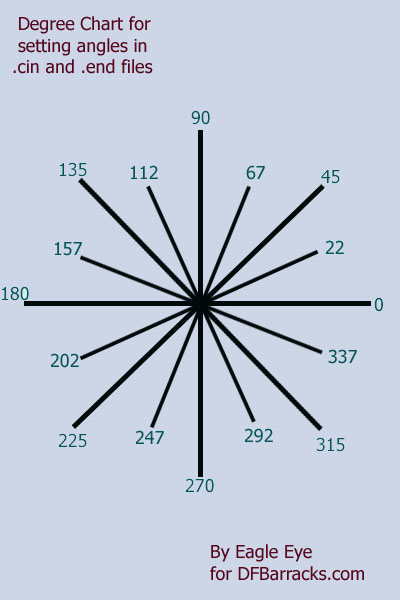
So, in the following file..
BEGIN MOVECAMERA
TICKS_START 0
TICKS_DURATION 600
CINDEX CAMERA1
CBEGIN 1539.165 -454.330 50.2 75 345 000
CEND 1207.626 -393.542 58.0 135 345 000
FOV 4259840
END
The yellow and orange figures are the camera start, and finish angles, use the chart to figure these out.
The camera would start at grid Location 1539.165 -454.330 , at a height of 50.2 pointing 75 degrees, then it would run to grid ref 1207.626 -393.542, panning around to point 135 Degrees, at a z value of 58, as it goes, this would happen over a period of 600 ticks..
I found placing a tree where you want the camera's is the easiest way to get the grid location, just use the x, and y values of the trees you
place..you can delete the trees later..just click on the tree, and look at the info panel on the lower left of the Med..in the pic below, you can see
the highlighted x/y co-ordinates are taken from the tree..
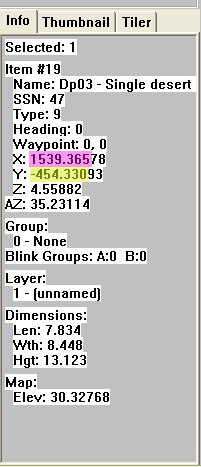
Also, you DO NOT need to re-encrypt the .cin file, or .end file, just use a text editor to create one, the same as
you do a wac file, just make sure it's called the same as your map, with a .cin, or .end file extension...the game will still read it..
here is a .cin/.end file with 3 camera angles..
BACKUP_DIR "D:\nc\df5bin\"
PRIMARYCAMERA_INDEX CAMERA1
BEGIN MOVECAMERA
TICKS_START 0
TICKS_DURATION 180
CINDEX CAMERA1
CBEGIN -437.337 361.385 62.0 100 345 000
CEND -437.337 361.385 62.0 100 345 000
FOV 4259840
END
BEGIN EDITFADE
TICKS_START 170
TICKS_DURATION 20
CINDEX_BEGIN CAMERA1
CINDEX_END CAMERA2
END
BEGIN MOVECAMERA
TICKS_START 170
TICKS_DURATION 180
CINDEX CAMERA2
CBEGIN -515.63 455.390 61.0 180 345 000
CEND -515.63 455.390 61.0 180 345 000
FOV 4259840
END
BEGIN EDITFADE
TICKS_START 340
TICKS_DURATION 20
CINDEX_BEGIN CAMERA2
CINDEX_END CAMERA3
END
BEGIN MOVECAMERA
TICKS_START 340
TICKS_DURATION 250
CINDEX CAMERA3
CBEGIN -544.977 414.305 61.0 90 345 000
CEND -545.377 438.562 61.0 90 345 000
FOV 4259840
END
The TICKS_START is very important when using more than 1 camera, you need to make sure they start in order...so if you look at the file above, you
will see they are ordered...notice that 0 + TICKS_DURATION 180 = 180, the next camera starts at 170, 10 tics before the last one finishes and 170 +
TICKS_DURATION 180 = 350, the next camera starts at 340, 10 tics before the last one finishes
More to follow later..
I have renamed this thread, and made it a Sticky, I think it's an Important Thread, and I'm glad Porov asked the question..
EE
|
|
|
Eagle_Eye
|
|
OK, I finished my Demo Map, I edited my TDM..Naval base, into an SP mission..right click on the link below, and "Save Target As", then save it to your
Hard Drive.
http://images.dfbarracks.com/users/eagleeye/Zips/CinEndDemo....
It contains...
bms
bin
end
cin
mis
pcx
It opens with 3 different camera angles, and ends up at the player..
Play the mission by blowing up the Ship with 2 flat packs..and watch the end camera..Looks Cool I reckon..
You can use the .cin and .end file in my zip to create your own...use a text editor like Notepad, I use Edit Plus..
Just don't forget to "Save As" if you edit mine, or, you can just copy and paste all the text from either of my files, into a new text file.
You will need to have the /d command invoked to run the map..
Make sure your game is updated to version 1.5.0.5, or it may not work..
My Job Here is Done...LOL..
EE
|
|
|
p1gs1ck
Map Rater
Posts: 522
Registered: 7-18-2003
Location: Limbo
Member Is Offline
Mood: Vegas2!
|
|
If you don't ask...
What a fantastic demonstration of a solution to a problem - this is probably the most comprehensive answer I've seen on this site...
Nice one EE!

"I am not responsible for your stupidity, but if I had a sledgehammer it could be arranged"
|
|
|
Eagle_Eye
|
|
Thanks p1gs1ck, I've added to the above 2 posts since you where here as well, they now have another pic, and a heap more detail..
EE
|
|
|
joselz
Colonel
Posts: 491
Registered: 4-24-2004
Location: Davie, Florida, 33325. United State
Member Is Offline
Mood: OUT of MAPPING
|
|
| Quote: | Originally posted by p1gs1ck
"this is probably the most comprehensive answer I've seen on this site..."
Nice one EE!
|
Yea, my Opinoin is the same: "this is probably the most comprehensive answer I've seen on this site"
Great work mate, thanks for the info
Thanks for all that EE
|
|
|
| Pages:
1
2
3 |












![[*]](images/aventure/default_icon.gif)


