
FoxHoleSam - 5-12-2005 at 11:17 PM
How can I get my waypoint names to show up on the map. I played one map with names showing, but I can't get it work for me. If people included the
.mis file, it would make it easier for people to learn new mapping skills. Just a thought!
Jonathan - 5-13-2005 at 02:13 AM
While it could have been made clearer in the MED manual, check page 16. I've made a small map with just the player and 2 waypts with names. Is
there a way to send you the mis file via U2U?
If not, here's the basic steps:
1. Under Edit, Waypoints, select any available blank slot and check the "Blue Team" Waypoint box. Give it a name like "Player Waypoints" if you
like.
2. Go to the map and insert as many waypoints as needed.
3. With all of your new waypoints selected bring up the Item-Attributes list.
4. Under the Waypoint-List selection box, pick the name of waypoints entered in #1 above. Also check the "Navigation Waypoint" Checkbox.
5. Exit the Item-Attributes list and select just the first waypoint.
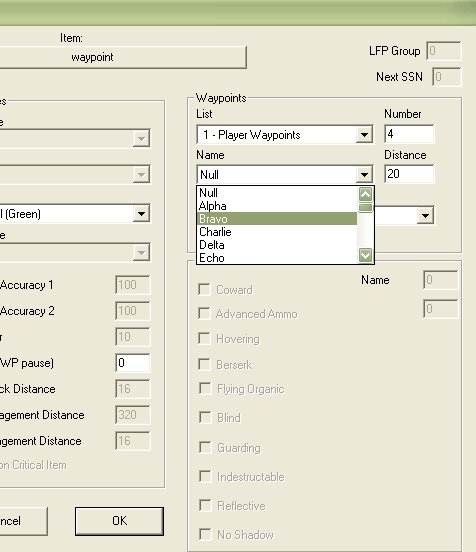
6. Bring up the Item-Attributes list, go to Waypoint-Name selection box and pick a name. Anything from Alpha-Zulu.
7. Repeat step 6 for the rest of the player waypoints.
hope this helps.
Jonathan
FoxHoleSam - 5-13-2005 at 04:52 AM
That's exactly the way i have them set Jonathan. They just don't show up. I'm talking about the waypoint names, not the waypoints. They show up ok.
Thanks for taking the time to answer though. I appreciate it!
Eagle_Eye - 5-13-2005 at 03:50 PM
Select each waypoint in turn, and use the edit item attributes, pull down the name of the waypoint you want..
If you want custom waypoint names, you will need to create your bin file..
Now..this won't show them on the map..but where you see the distance to the next waypoint it will give you a name..rather than "Null"..
Otherwise, you will need to create a "Named Map Location"..once again, you will need a custom bin file to give your names..this WILL put names on the
map..when you press the map button in game..
I'll do a little tut on that soon..
EE