Delta Force Barracks Forums

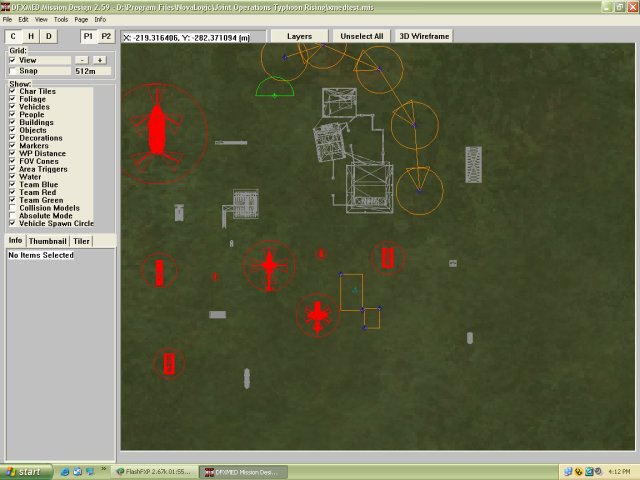
Using the Xtreme med with JO and JOE

Eagle_Eye - 4-24-2005 at 03:58 PM

Well..I was successful in getting the new dfxmed to work with Jo and JoE..

The good thing is that we can now create bms files without having to convert the bms files from bhd format to Jo..

I have already deleted the AB med ..sorry AB..

If you already have xtreme..here's what you do..

Go to your xtreme install..and copy the following files to your Jo install..

dfxmed.exe
med.pff

Now..create a desktop shortcut for the med..name it someting like JO XMed..

Now, right click on the shortcut..and add the following to the end.. /exp jox01 , don't forget the space..between the " and the /

"D:\Program Files\NovaLogic\Joint Operations Typhoon Rising\dfxmed.exe" /exp jox01

If you don't have JOE, then dont use the shortcut..just use the med as it is..

I'll create an upload soon for those who don't have Xtreme..I'll post a link when it's up..

I will include the pff file, the med, the med manual, and shortcuts..

###EDIT###

JO:IC usage..

"D:\Program Files\NovaLogic\Joint Operations Typhoon Rising\dfxmed.exe" /exp ic


EE

Eagle_Eye - 4-24-2005 at 10:19 PM

OK..here is the Download..

New installer that covers JO, JOE, JOR, & JOIC

Does not work with JO:IC 4.1.2

DFX Med TO JO ALL

DFXMed To JOE

I included the med, the med.pff, and the Med Manual.
The download is an Installer, just download and run it..
It will create shortcuts on your Desktop with the correct / extensions to see JOE.

Follow the on screen instructions..

Look..I can see JoE Stuff..LOL..


See this post for more info..

http://www.dfbarracks.com/forums/viewthread.php?tid=39464

EE


chrislew200 - 4-24-2005 at 10:45 PM

ive just installed it now EE so hopefully within a couple of days i should have some topics up on the boards for it

chipmunk65 - 4-25-2005 at 07:09 AM

we can make maps with people hacking the now nice one EE:cool::D

100%

Amp - 4-25-2005 at 06:49 PM

Is the editor 100% compatible? JOE
Does it totally replace AB bullet editor?JO
Does it set object heights correctly?
There has to be something wrong with it.
Right?:o

chrislew200 - 4-26-2005 at 03:41 AM

have run several checks on nile myself at first i thought there was trouble with the tile pallete crashing it. But i found it isnt that it was me.

I fiind it very stable.

Xtreme med with JO and JOE

Who42 - 4-26-2005 at 06:04 AM

Xtreme med with JO and JOE
OWE MY GOD IT WORKS :P WHY ON EARTH DID NOVALOGIC PERSIST WITH NILE OR AT LEAST RELEASE THIS AS AN ALTERNATIVE BEFORE No crashes ,water colour etc every thing works like it should THANKs EE
Thanks AB for your mis edd to:o

Amp

Amp - 4-26-2005 at 11:44 AM

Yes a system shock here too. Now we need a better npj to mis with proper import in heights and stuff and we are rolling.

wubbaldo - 4-26-2005 at 02:22 PM

Sweet...
I just wanted to thank Eagle_Eye personally for all the support you have given us.
DFX editor...
Now if it had the 3d shade (window that NILE has) I'd be in 7th heaven. I place all my stuff, people, vehicles, etc. in 3D...

Upon seeing all this I wonder if the limits have been raised for foliage, vehicles, etc.. meaning the number of them you can have in a game.

At present I'm trying to uncover the little limit bug and then I'll have another map to add to the collection of DFBARRACKS.

Thanks for all the support and back to map making, and terrain making, oh yeah.

NILE WITH XTREEM

Amp - 4-26-2005 at 03:30 PM

Im experimenting with NILE converted to MIS. I converted a Nile layout and used MEDX to see results its not great but workable some minor items were lost in coverting. I then highlighted all items in NILE raised the height to 100 enabled absolute. Converted again. Selected a building found its ground position. Saved and fired up JOE and confirmed it looked good. I then selected the adjusted building, using select type in MEDX found the value difference from height 100 and lowered all buildings of that type at once. Saved and fired up JOE, the results are quite acceptable. Looked good. I know I have way too much time on my hands. I think my Nile layouts in waiting can now be useable, a bit of work but I can use Nile candy for layouts, and event with MEDX. Im still experimenting. Thx EE and AB for the old editor is was the editor of choice for me.

Eagle_Eye - 4-27-2005 at 02:40 AM

Quote:
Originally posted by wubbaldo
Sweet...
I just wanted to thank Eagle_Eye personally for all the support you have given us.


Not a problem wubbaldo...I have to do something in my spare time besides look after the kids, do housework, shopping, cooking...etc..etc...etc..LOL..

> OldMan < - 4-27-2005 at 09:03 AM

something really bad is that one cannot change a npj-file right into a mis-file. I looked at this. Normally not the problem, but much less and differant information have npj-file and DFXMed needs more. and Nile doesn't convert the mis-file right with the import often. Therefore, one can forget the way. 'In Nile all ready does -->> converted npj to mis -->> missing options in DFXMed insert -->> and as bms save.
I cannot understand the enthusiasm! There was all already previously. What now should be different? It changed nothing. All like before.


HAPPY Enough

Amp - 4-27-2005 at 04:03 PM

If we could have an npj to mis converter that imports everything but eventing.
Im more concerned about what you see in nile is what you get in mis it would be great. To me so far XMED will be my choice editor. In Nile I continously have to do things over and over again in events. The change for me is I can make escalation maps.

jabo1SFH - 4-27-2005 at 06:21 PM

i have noticed that the med will go on the blink after a few hours of constant use. certain areas will not work, and i have to make sure to "save as" and export. then i have to restart the med, but it has not has not crashed, and that is great.

one thing i am having trouble with is the map named location. i use the marker and run the text tool(i had one from the bhd mod tools), but in the map it still shows "LOCATIONXXX". any ideas?


:)

Eagle_Eye - 4-28-2005 at 01:19 AM

jabo1SFH, if you constantly open up other maps on page 2 of the med..for copying stuff to page 1.. then then the med becomes unstable and crashes..

All the Med are the same..right back to DF2..they all don't release the ramproperly..and after loading up one map after another, wilkl most certaonly Crash out ....I found about loading 8 maps..one after the other, in any mad will cause this..

This may not be what's happening to you..but it's just a thought..

Oldman..I haven't given upp on NILE..it has it's uses as well..I suppose I'm just used to using the old one..!!

EE

EE

> OldMan < - 4-28-2005 at 04:16 AM

I also. I work with Nile. I need the 3D View lol. and the DFXMed is the same like the other one only without convert bhd-mis to jo-mis. and Nile on DFX-CD is normal Nile 0.85.
And for all again. its not possible to convert correct npj-file to mis-file. and if you load a mis-file in Nile, Nile mixup things also.
Therefore, I say again. It is all as it was. Nothing changed.

jabo1SFH - 4-28-2005 at 05:17 AM

no, i havent used page 2 yet. i am working on a map, and after about 3-4 hours things like the item list to insert an object would not work or i would click on inset and the last thing i copied would show up. just seems minor though and i can work around it.


map named location???


:)

wubbaldo - 4-28-2005 at 05:39 AM

Just wonderful....(backhanded compliment)
Amp:
I found in Nile if you are cutting and pasting between maps then this redoo process rears its ugly head, and I do mean Ugly.

The latest map I'm working on (insert shamless plug here...Git-R-Dun-1-Mission 3) I have not cut or pasted anything into, and have not had the WAC problem at all or the waypoint list corruption. I assume that the no free up memory thing has something to do with that.

There fore I do not cut and paste any more.

Conclusion: when you have two niles open you are not going to be able to control the wac file generator in the to map. It just messes it all up.

Hope this helps.

Rehash: I again would like to see the 3d shade view as I do everything in 3d, like placing bad guys on tops of buildings so they do not fall through, placing tree groups so they are not up in the sky and so on.

NEW QUESTION:
Does the people count include your team members? ie. 254 bad guys and me = 255 people. If this is correct then I have to edit out some folks from the map I just created as I have 254 bad guys..yes I know it is extreme...hey we should name a game after that....Do'h... (DFX)

Its a matter of taste

Amp - 4-28-2005 at 05:42 AM

Im with EE theres nothing wrong with NILE lol, I setup my layout in Nile, save it as NPJ, from that point on Nile never sees that map again. I was spoiled by ABmed. I know when I event that puppy things are gunna work. I can once again use many more items and differrent items in a map then you can in NILE made maps. Im still trying to find Tango limits for DFXmed.


wubbaldo - 4-28-2005 at 05:49 AM

Amp:
So then if you want to say add things then you create another NILE file or use your old NIle file and convert it again.

What I did on the first map was to do the WAC all by hand then add it to the files to the game. That worked great.

I did notice in the new med that when I imported in my NILE file the ssn's were renumbered. That would have mad it almost impossible for me to remember which guy went to which vehicle... etc...

Is this just me or ?

Thanks.

wubbaldo - 4-28-2005 at 05:54 AM

Jabo___:
When working in a med for 3 or 4 hours the only thing that I can think of that will corrupt "Windows" is the programs that are running in the background. The virus scanners are the worst offenders. I use NOD32. It has never interfered with any running application to my knowledge. My test for this are the Video editing programs that I have running, they get cranky when anything but themselves are running..no problems with NOD32.

Screen savers are a suspect also.

Just a thought...

p1gs1ck - 4-28-2005 at 06:26 AM

Good work Eagle in providing this med for mappers to use in JO. Might tempt some of the BHD map makers over :)


Just a thought - anyone know how to adjust pitch and roll in 3d view in the DFX med? (without editing values in item attributes).


P1g

Confused I am

Amp - 4-29-2005 at 06:34 AM

wubbaldo I meant I only set my terrain and buildings, decorations, foliage, I dont put ai, vehicles or anything that has events. If I need to add more items I do it in DFXMED I never return to Nile. I convert to mis. From that point on I USE DFXMED to finish. I hand edited NILE maps also but in my mind AI in med have much more behaviour and potential. I dont need AI with massive vision and accuracy, I dont need to keep re eventing, waypoint list as I want to make eventing changes to the map. Ill agree Nile to me is more frustration then usuable. DFXmed is more like ABmed Its just a matter of taste I guess and what I am use to using.

jabo1SFH - 4-29-2005 at 08:51 AM

Quote:
Originally posted by wubbaldo
Jabo___:
When working in a med for 3 or 4 hours the only thing that I can think of that will corrupt "Windows" is the programs that are running in the background. The virus scanners are the worst offenders. I use NOD32. It has never interfered with any running application to my knowledge. My test for this are the Video editing programs that I have running, they get cranky when anything but themselves are running..no problems with NOD32.

Screen savers are a suspect also.

Just a thought...


never had a problem like this with other meds....no biggie, i just make sure it saves through save as and export. i also have been saving alot every few mins just to be on the safe side.

pretty much finished my a&d map.


thanks for the editor EE.


:)

wubbaldo - 4-29-2005 at 12:35 PM

Amp...
Ok I understand now...
I' will give your way a try.
The only difference is that I'll place all the bad guys and vehicles.
Then I'll convert the file and continue with DFXmed to do the eventing.

By doing it this way I can have the best of both worlds.
P.s. thanks for your kind remarks, I appreciate it when someone gives me new ideas on way to try things. Most often they are right , they do have a better way of doing things. I'm from the old, and I mean old school, when you had to load programs by tape...Yup that old...

Thanks again for the advise, it is appreciated.

bigsmellyfart - 5-1-2005 at 11:18 AM

ok i cant find the xmed on the xtreme disc
some one said something about it here about if you have dfx you dont need to download there was a post in map builders forum but i cant find it seems it was not a perminant post that doesnt move with each new post or Bump "
help please. tnx bsf

Eagle_Eye - 5-1-2005 at 11:29 AM

Install the game..it will put a copy in the DFX Game folder..


jabo1SFH - 5-2-2005 at 07:51 AM

Quote:
Originally posted by bigsmellyfart
ok i cant find the xmed on the xtreme disc
some one said something about it here about if you have dfx you dont need to download there was a post in map builders forum but i cant find it seems it was not a perminant post that doesnt move with each new post or Bump "
help please. tnx bsf


can he just pull it from his dfx folder?


:)

Tiles

Amp - 5-4-2005 at 04:07 AM

Anyone get tiles to work? When I check map in editor it labels all tiles as unknown. Other then that this editor is real nice.

Eagle_Eye - 5-4-2005 at 04:31 AM

Tiles work OK for me..and Chris tried them as well..

THX Tiles

Amp - 5-4-2005 at 05:35 AM

THX for quick reply. ANY tile set works ?
Therefore I just ignore integrity check ?.
This editor is real nice.:cool:

ICE_PIC_JAPAN - 5-22-2005 at 08:28 PM

Quote:
Originally posted by Eagle_Eye
Tiles work OK for me..and Chris tried them as well..


Hi EE, I thank you for your big work.
And I cant zoom in n out when on
3D view.
Please teach me how to zoom.
and I could play with ai n they can drive D:

ICE_PIC_JAPAN

T0P-CS- - 6-8-2005 at 08:46 AM

I followed the instructions on copying the dfxmed.exe and med.pff files to the JO folder and the med works fine... Problem is when I go to host the map and see how it looks the map is listed but JO won't run the map... any ideas what I'm doing wrong...

chrislew200 - 6-8-2005 at 09:01 PM

What Error comes up

T0P-CS- - 6-10-2005 at 03:25 AM

Quote:
Originally posted by T0P-CS-
I followed the instructions on copying the dfxmed.exe and med.pff files to the JO folder and the med works fine... Problem is when I go to host the map and see how it looks the map is listed but JO won't run the map... any ideas what I'm doing wrong...


Problem solved... I had objects that only JOE would recognize... when logged in under JOE maps loaded fine... then when removed JOE related objects the maps loaded fine under JO....
Thanks... Top

Awesome

jonagent - 7-9-2005 at 09:03 AM

This is great because I HATE N.I.L.E. Whos with me on that one lol it always crashes when i put a vehicle on the area so thanks guys.

Hey Guys It dident work for me

jonagent - 7-9-2005 at 09:18 AM

I Did it like you said but it just opens the DFX stuff could it be because i have both JOE and DFX?

Eagle_Eye - 7-15-2005 at 05:38 PM

Did you put the dfxmed.exe in the JO folder ?

if you have DFX installed, just copy the dfxmed.exe, and the med.pff to your JO install folder, then create a new shortcut for the dfxmed.exe.

You don't need to alter the shortcut if you don't have ESC installed, but, if you do, follow the details in my first post.

EE

getting stressed out

lman 1994 - 9-27-2005 at 09:25 AM

oh man this med wont work either all the peolple and vehicals appear when i run the game but the terrain still wont!!!:o :o :o

LtAttack - 12-27-2005 at 04:07 AM

ok ee i got the xmed on the jo but i cant get it on jo E :( help plz

Eagle_Eye - 12-27-2005 at 05:37 AM

If you used my lastest download, it will create the shortcut for you..

To do it manually, right click on the desktop icon..go to properties and add to the target line..

"D:\Program Files\NovaLogic\Joint Operations Typhoon Rising\dfxmed.exe" /exp jox01

D:\ is where mine is..so yours may be different..

EE

Brad.G - 2-5-2006 at 10:53 PM

ok... ive learned nile, and wac files inside out... time for a new learning curve.

dfx med here i come!

Mstenger404 - 4-28-2006 at 11:13 AM

okay i installed it and i opened it up but no objects show up in the insert screen and general info's slots are all empty. any help peez?

Eagle_Eye - 4-28-2006 at 03:53 PM

Did you select the directory where your Jo Installation is?

The symptoms tell me you didn't..

Locate the folder where you put the files, and delete them, also the desktop shortcuts, cos they point to where you installed it to..

Reinstall to the directory where your Jo install is.

EE

Mstenger404 - 4-28-2006 at 10:17 PM

okay i got it to work, the installer asked where my JO E is, but said nothing about the main game. so yeah i got it to work now.

Eagle_Eye - 4-29-2006 at 02:26 AM

It says select the directory where your JO/E is installed....same place.....


Mstenger404 - 4-29-2006 at 08:35 AM

:l..........

okay... who cares because now i got it to work.


another question:

whats the event command for getting ppl inside vehicle positions?

chrislew200 - 4-29-2006 at 08:45 AM

You send them to the vehicle as if the vehicle is a waypoint i think its waypoint lists 124,125,126 one of them will work.

As your question related to installing the dfx med is now complete could you now ask your map making questions within the map making forum.

Reguards
Chrislew200

bikerxxuk - 6-9-2006 at 10:26 AM

Hi E_E,
I have followed your instructions at the top of this post for installing the med with shortcuts. I have made sure that it is in the JO folder and the MED opens and works fine.

Now my query is this...

There are a lot of items missing in the Med that I know are in JO. For example there is no tank in the insert vehicles box.


Thanks

Steve

Eagle_Eye - 6-9-2006 at 06:07 PM

Are you using just JO, or ESC or IC, or something else?

Is the name of the Tank there, or are you just missing the Med pic for it?

bikerxxuk - 6-10-2006 at 04:48 AM

I just have JO installed.

There is no tank at all. No name in the vehicle list and therefore no med pic.

I have other JO objects, like the ruins etc.

I'll install JO esc over the weekend and see if that helps.

p1gs1ck - 6-10-2006 at 05:30 AM

There are no tanks in JO:TR

JO esc has them - so installing it will help.

Eagle_Eye - 6-10-2006 at 11:56 AM

Exactly....I had to check though..lol..

bikerxxuk - 6-10-2006 at 12:54 PM

That will be it then, thanks chaps.

I was sure that there was one type of tank on JO, with more types in teh expansion. Just shows how wrong one can be.