
Eagle_Eye - 8-11-2003 at 05:05 AM
Loading A Skin Or Other File Into The Game-
If you want to use a skin, .wac file, .bin file, .cin file, .end file, .pcx intro pic etc...or any edited item it doesn't need to be packed. You can
just place it in the DF directory and turn on the "use resources from the folder" instead of the pff file.
To do this you must edit the target line of your DF icon. Find your icon, right click on it, go to properties. On the target line, right at the end,
after the last " add in a (space)/d then hit OK. See the pic below. It works for all the DF series, Except DF1, where it must be packed into the pff
file.
JO and DFX do not need the /d to run extrenal files, just drop them in the JO/DFX folder, and the game will find them...well, this was true up until
the last update...,
I suggest you have 2 DF Icons, one standard, and one with the /d, then you can run the Standard one for Internet Gaming, and the /d one, for SP
gaming..as mentioned just below..
There are other switches as well..
(space)/s = save the game scores to a text file after each game
(space)/w = open the game in a window
(space)/vidtest = force a video card test..
Note: As I found out with Havoc, if your not running the NoCd patch, the /d command may cause your DF software to crash, or just not start. So if you
have problems, download and install the NoCd patch from the downloads section. Make sure it matches the version of the game you are running.
A Word Of Warning-
I use skins on my Home lan, You may not be able to use Skins on a Nova Server. The server must have Player Skins Enabled. If you keep getting tossed
out of a game, you will need to turn off the skins by removing the /d, Alternately, you could have 2 icons, 1 normal, and 1 with skins enabled.
I believe Cheat Blocker will detect any changes in your PFF file if you Pack them, so use them at your own risk.
Creating skins that give an unfair advantage to a player is considered Cheating, and is not condoned!

Now just place the skin or other file in the Game directory. If you want to get rid of it, just delete it, or move it out. Saves a lot of time when
you want to test a skin.
Making Skins
You will need a copy of Paint Shop Pro or preferably Photo Shop 7.
To edit skins from BHD, JO & DFX, you will need to download a dds Plugin from Here. Don't forget to install the dll, it goes in the c:windows\system folder.
You will need to be able to extract the files from the PFF files to edit them, you can get that From Here.
For Joint Ops, the dds files are compressed, so you need these tools to decompress them..Devilsclaw Tools
Now you need some skills with Photoshop! I can't teach you, you will need to learn for yourself.
Place your skin into the Game folder, make sure it is named exactly as the original was.
Please don't post your objections to skins in this thread, I will delete them, if you want to complain, start your own
thread in the rant and rave forum.
Regards
EE
File links checked and Post Updated on 03APR07
Loading a DDS image
Eagle_Eye - 8-11-2003 at 11:02 AM
After you have your plugin and dll installed, and you have extracted your dds file, you can load it. Do so from the file menu, during loading, you
will be prompted with this.
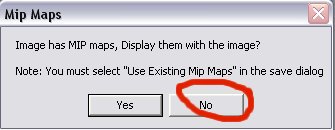
Say no. This will load the image without the mip map images as well. It will be easier to edit without the other images being in the way.
Regards
Saving a DDS image
Eagle_Eye - 8-11-2003 at 11:08 AM
Once you have made your DDS image, you need to save it, select "save as" form the file menu, under format, choose DDS, then name the file the same as
the original.
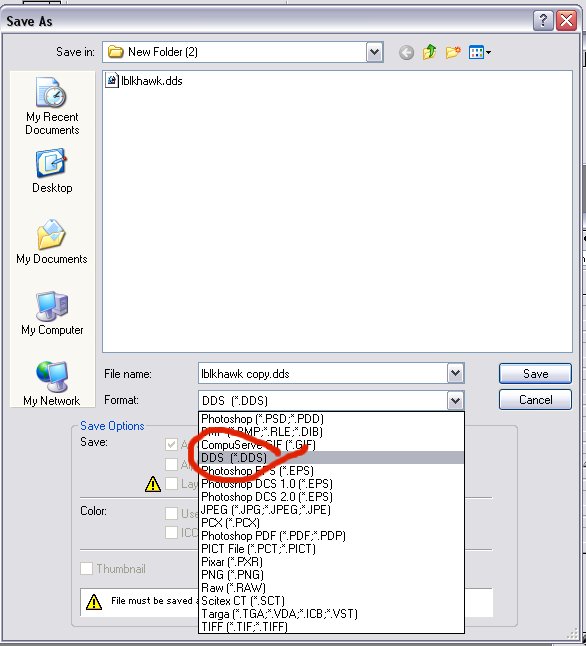
Now this dialog appears.
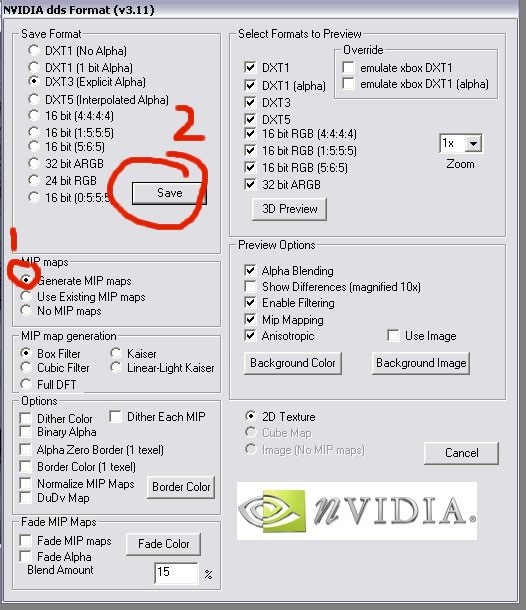
Make sure you have "generate mip maps" with a dot on it, then save it.
Don't forget to name it exactly the same as the original. and place it in the game folder, invoke the /d command and go have a look.
Regards
Eagle_Eye - 8-18-2003 at 03:54 AM
If you can't get the dds plugin to work..read this..
Photoshop DDS plugin and the PaintShop Pro plugin : this tool opens DDS Textures direct in Photoshop or Paint Shop Pro.
dds.8bi install in ...C:\Program Files\Adobe\Photoshop 7.0\Plug-Ins\File Formats
dds.8bi install in ...C:\Program Files\Jasc Software Inc\Paint Shop Pro 7\plugins
msvcr70.dll (install in C:\Windows\System)
Thats the only reason it won't work!
Eagle_Eye - 10-25-2003 at 03:02 AM
You can get my skins for BHD as samples here..
http://www.dfbarracks.com/mapdb/index.php?action=dm&mid=4618
http://www.dfbarracks.com/mapdb/index.php?action=dm&mid=4426
http://www.dfbarracks.com/mapdb/index.php?action=dm&mid=4422
http://www.dfbarracks.com/mapdb/index.php?action=dm&mid=4415
EE
ICON - 11-21-2003 at 05:19 AM
Hi! Thx for the info on how to make the skins, easy to follow instructions.
BUT I need som help with the Photoshop 7 anyway. My problem is when I have extracted the files I need and open them in Photoshop, you will notice the
layers (the different items) are locked! How do u unlock these layers ? Is that Possible?
I have already made myself one Yello chopper, a "rough" skin, and not very good, but this was my first try. Think the skins will be better if you can
open the layers and work with the individially parts of the BlackHawk for example.
HumanTarget - 11-21-2003 at 12:03 PM
u cant split it up, but u can cut the parts up and layer them urself it's the easiest way. u cut the parts, and then put them on seperate layers, and
leave the base layer as the original skin, that way u can go back to it at any time.
much easier and safer that way, then u always have a back up. plus if colouring, use the hue changes, or lightly spray a different layer and set
transperancy so that the texture of the object doesn't disappear. other wise u could end up with a smooth blackhawk. which just looks dodgy.
if u wish to check mine out go to this link  HT's Skins
ICON - 11-22-2003 at 10:45 PM
Already been to your site HT And I must admit your chopper is better than mine
(yet) :D
Did u paint spray the camo colours, or did u add a camo layer on top of it ?
HumanTarget - 11-22-2003 at 10:55 PM
i painted a seperate layer, used about 50% transperancy and then removed bits of the layer where i thought i needed the better texture of the original
chopper. like the warning markings on the engine intakes and the winch on the bottom of the chopper, and groove lines, so that they were still
distinct on the chopper.
I also did the destroyed chopper skin, so if u blow it up it still looks the same, so had to remove the camo paint from the holes in the chopper lol,
otherwise it looks like it's still perfect lol
ICON - 11-26-2003 at 06:16 PM
Need more answers lol! :D
Noticed when im testing the skins, specially new uniform skins, they appear to be the original uniform when u look at them beyond 50 meters. Any
suggestion on how to undo that somehow?
Eagle_Eye - 1-2-2004 at 02:05 AM
Make sure you create mip maps when you save the skin as a dds format.
SEC Shootre - 8-21-2004 at 04:06 PM
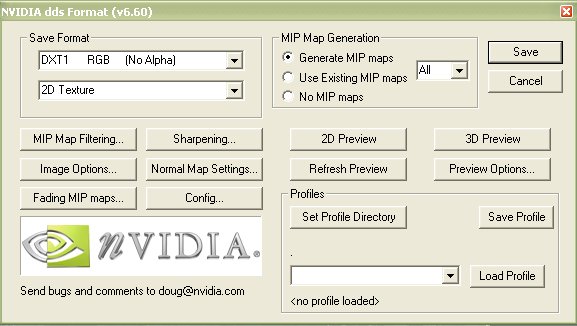
 this image is different in PSP8
 NEED HELP!!!!
HumanTarget - 8-21-2004 at 05:51 PM
Just use the settings that are listed there in PSP8. it will probably be a different look because u are using a different version of the dds plugin
since when that image was made.
Eagle_Eye - 8-22-2004 at 12:06 PM
Yeah, if you look at the top line of the image you posted, the version number of the dds plugin is there..in this pic it's 3.11.
BTW, you didn't need to rehost the image, you can use mine..right click on the image, go to properties, copy the url..ond use it in your post..
Here's the newer one..
EE
SEC Shootre - 8-22-2004 at 02:13 PM
yup that's it thanks
Sora - 8-28-2004 at 09:10 PM
When I want to extract a file from FwO and error comes up : Error in ExtractFile, Bad record number.
???
Eagle_Eye - 8-28-2004 at 10:09 PM
What file from which pff and which game?
Sora - 8-28-2004 at 10:16 PM
_FILES and BHD as the game.
Eagle_Eye - 8-28-2004 at 10:24 PM
Oh, easy..you can't access that pff file..it's it's read only....in all the DF games, and not accessable in any of them..
EE
ATi - 8-29-2004 at 12:42 AM
I appologise if this has been asked before and I think I already know the answer but can I use the skins from the download section with the BHD Demo?
Eagle_Eye - 8-29-2004 at 12:50 AM
I have no Idea Trade..lol..try them, I would think that the dds file names are probably the same names..but, I know you have to pack missions, so, you
may need to pack the dds files as well.
EE
Eagle_Eye - 10-10-2004 at 05:19 AM
Thread Cleaned Today, and extra info added to first Post concerning the JO compressed DDS files.
EE
SEC Shootre - 2-4-2005 at 04:02 PM
what about when you made a model and added a new textture what would it look like?it won't let me save the it as a dds. file
help
eNs..SpaDe - 2-6-2005 at 11:29 AM
I have recently made skins an actually put them in my resource pff file.. but then couldnt join other games an tried to put in the original skin an
still have the same problem.. what can fix this?.. an also.. is it possible for others to see my skin?..cuz when i applied it.. I seen a bunch of
Car15s the same as mine.. an others couldnt see mine.. what did I do?.. how can I fix it?.. an can I restore the resource file back to normal?
Eagle_Eye - 2-6-2005 at 12:13 PM
All players must have the skin installed to see it..
You see it on all players, cos you have it installed.
If you are going to add something to a pff file, always make a copy of the pff before you do..if you didn't, then the only way to get back the
original pff is to reinstall..
Unless you have a copy of the original file you edited..then you can just put in back into the pff, overwriting the one you put in earlier.
Shooter..I'm a bit lost here mate..!!
Did you textures the model in your 3d program?
3Dm max needs the files as a tga, so does the OED..
After you export the item to a 3di, and create a def file, you can load your tga's into Photoshop, and resave them as a dds, use the dds files in the
mod..the 3di will read them as if they where the tga's you assigned in 3d max...
If you can't save them, try again, sometime the save box doesn't "Un-Shade", so you can't save ..or, try a different dds plugin..
EE
EE
very co0l EE
eNs..SpaDe - 2-9-2005 at 05:55 PM
hey EE..ty for the reply.. but after some common sense I figured it out.. www.freewebs.com/elitenightstalkers.com there is a sample of the uniforms I made for the squad.. actually very easy when u mess around with it..
but one question if I may?.. what would be the file for the face.. say IdeltaRed ?
craigdavies2003 - 2-19-2005 at 05:58 AM
Iface01 usually. or FACE01. yiour skins camos are good but u seriously neeed to make armor more deatiled than just black with badges.
sharpsniper - 3-22-2005 at 01:21 AM
When I make a skin for a person on BHD the model looks inncorrect, its face is the wrong way round and his camo on his vest, boots are on his arm ect.
Can you help??
ƒáçlôñ mg§ - 4-9-2005 at 03:08 AM
u got minimaps on when you open the fire selcet no when this pop up comes up
and press no
fanx EE for hosting this
I need skin help
Cyntar_7 - 2-18-2007 at 03:37 AM
how can I have a skin on in a LAN match or is it even possible, because every time I just punt everybody out and they cant even see my skin!!! can
any body help
Eagle_Eye - 2-18-2007 at 06:51 AM
Each PC needs a copy of the file in it's game directory..any game lower than, and including BHD must have /d turned on.
EE
Durekn316 - 2-20-2007 at 03:29 AM
i have to go to novalogic the folder of BHD and run the game like tht. How do i run skins then?
Eagle_Eye - 2-20-2007 at 05:12 AM
Place your modified .dds file into the game directory, the one where the main files are kept.
Now, if you want, create a new shortcut, rename it ie: BHD Skins and modify the target line as above.
Now you have 2 shortcuts, one for playing Nova Servers with no skins (your original shortcut), and one for playing with skins..
EE